
We’re excited to introduce Extendify v3.3, bringing a completely rebuilt AI Agent with guided site setup, and proactive recommendations. This release also brings advanced branding customization for the AI Agent and a new MCP connector that lets users manage their websites from AI assistants like Claude and ChatGPT.
Here’s what’s new:
- AI Agent v2: rebuilt from the ground up
- Site and eCommerce setup
- Explore all AI Agent capabilities
- Task Center and welcome screen
- New branding customization for the AI Agent
- MCP connector for WordPress
Extendify v3.3 Overview Video
AI Agent v2: rebuilt from the ground up
We’ve come a long way since introducing the AI Agent and our focus remains the same: making it as effortless as possible for users to create and update a WordPress website. This new agent foundation makes it more capable and lets us add more advanced features that help users complete complex tasks in a more intuitive way.
Refreshed look and feel
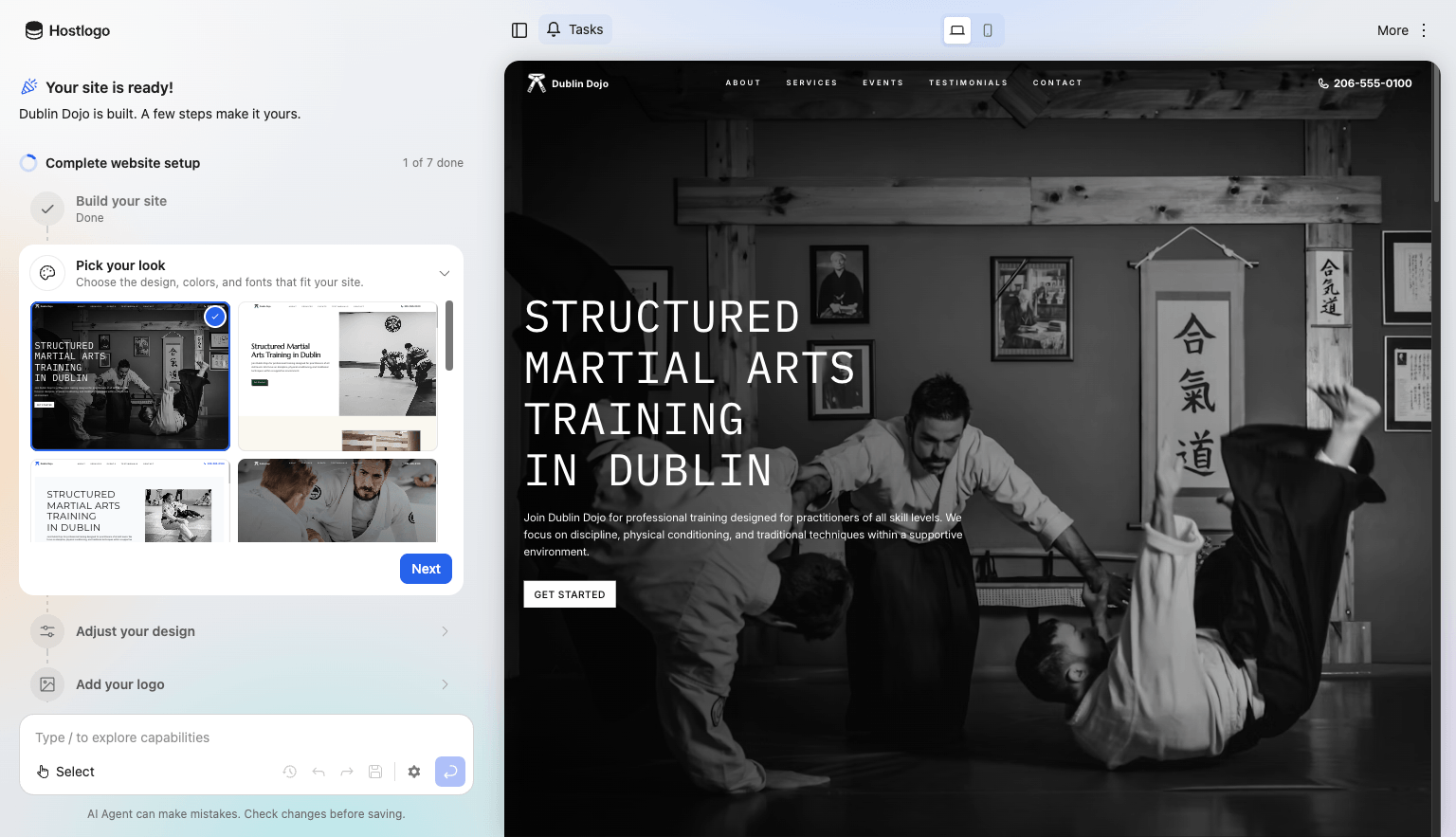
The new agent wraps the site within an iframe. It also gives more context on what it is working on and you can often see the changes being made in real time to the site. It also requires fewer page refreshes for a smoother overall experience. Quick Edit gets a new experience as well, letting users make fast edits without ever needing to open the block editor, while staying out of the way as they view and navigate their website.
More powerful agent
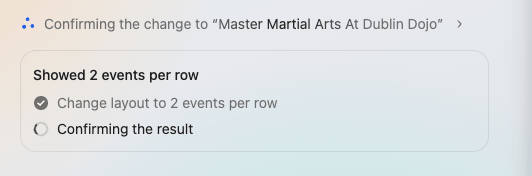
A new plan mode allows the agent to handle more complex, multi-step changes. It will also check its work to make sure the change matches what was requested.
More capabilities
We’ve added a lot of new capabilities, such as changing the website header and footer items, creating blog posts, updating the navigation menu, and AI Abilities support for more Product Platform plugins. We will continue to add additional tools and workflows for the agent.
Version history
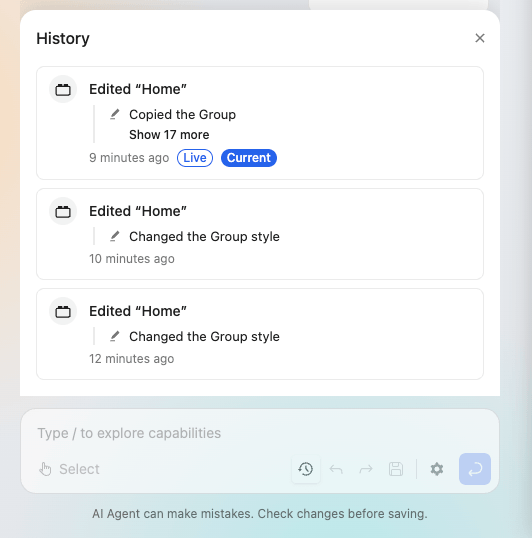
We all know that AI is never perfect. Now, users can view version history, preview or restore previous versions, and undo/redo changes from the agent.
Agent selections
The selector tool still lets users quickly point to a specific element on the page, and now the AI Agent can use it too. When a request isn’t clear enough, the AI Agent asks the user to select the element they want to change. In many cases, it can also find the right spot on its own. For example, when a user asks to “add an FAQ question about our 15% student discount”, the AI Agent finds the FAQ section on the page and updates it, without the user having to select anything.
Suggestions
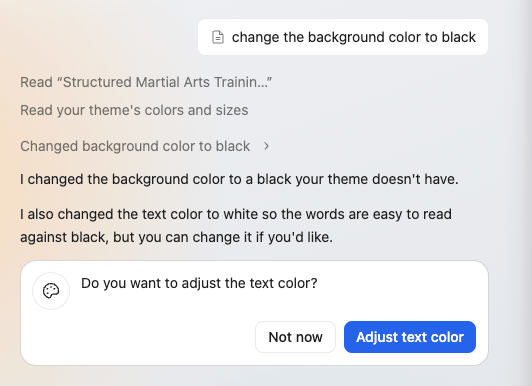
The AI Agent also looks out for the user, suggesting improvements to their requests. For example, if the agent notices that no site icon is set, it will find an appropriate time to recommend that the user set one. Additionally, if the user changes something that has unintended consequences, like “change the background color to black” and the content no longer has enough contrast against it, the AI Agent flags the issue and suggests better colors. This helps users keep their website readable and accessible, even when they’re not design experts.
Site and eCommerce setup
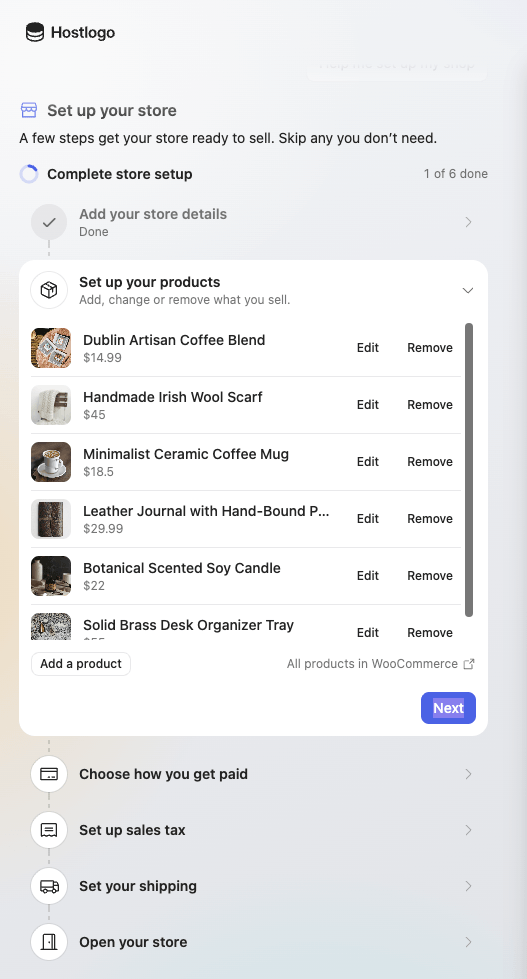
Once users have created their website from a single prompt, the next challenge is making the final adjustments so it’s ready to promote. That’s why we’ve created a guided experience where users can quickly review and update key items like design choices, logo, and site title. Store owners get the same guidance for eCommerce, setting up their currency, tax rates, and payment methods, transforming what used to be a multi-step task into a simple, guided experience.
Explore all AI Agent capabilities
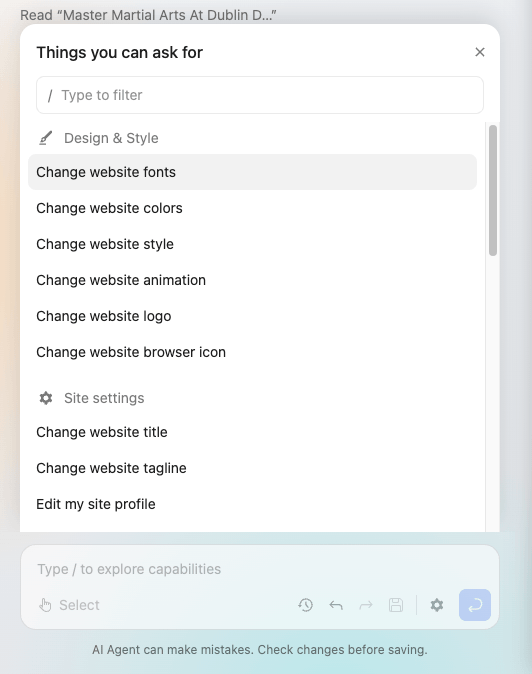
Users can now browse a full list of what the AI Agent can do, filter it, and run any capability with a single keystroke. This encourages users to explore what’s possible and doubles as a practical learning tool. The list updates automatically based on what the user is viewing and the plugins installed on their site. For example, a WooCommerce store automatically shows actions to manage the store.
Task Center and welcome screen
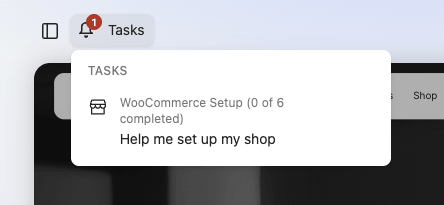
To help users understand the best next steps for their website, we’re introducing a Task Center that brings all recommended pending actions together in one place. When users return to manage their site, a welcome screen in the AI Agent sidebar also suggests the most relevant actions for them to take. With these recommendations, the AI Agent evolves from a passive tool that only responds to requests into an active partner that suggests what to do next based on the current state of the user’s website.
Enterprise partners can add tasks for additional services or time-limited promotions. If you’d like to discuss how this could work for you, please reach out.
Rollout timeline and test URL
As with every major change, you can safely update to the latest version now. The new AI Agent will be enabled on November 24, 2026, to give partners time to update their marketing materials. Contact us if you want it enabled sooner or need more time.
To test the new experience, add /?extendify-preview=agentx to the URL of a site created with Launch, using the latest Extendify and Extendable releases.
New branding customization for the AI Agent
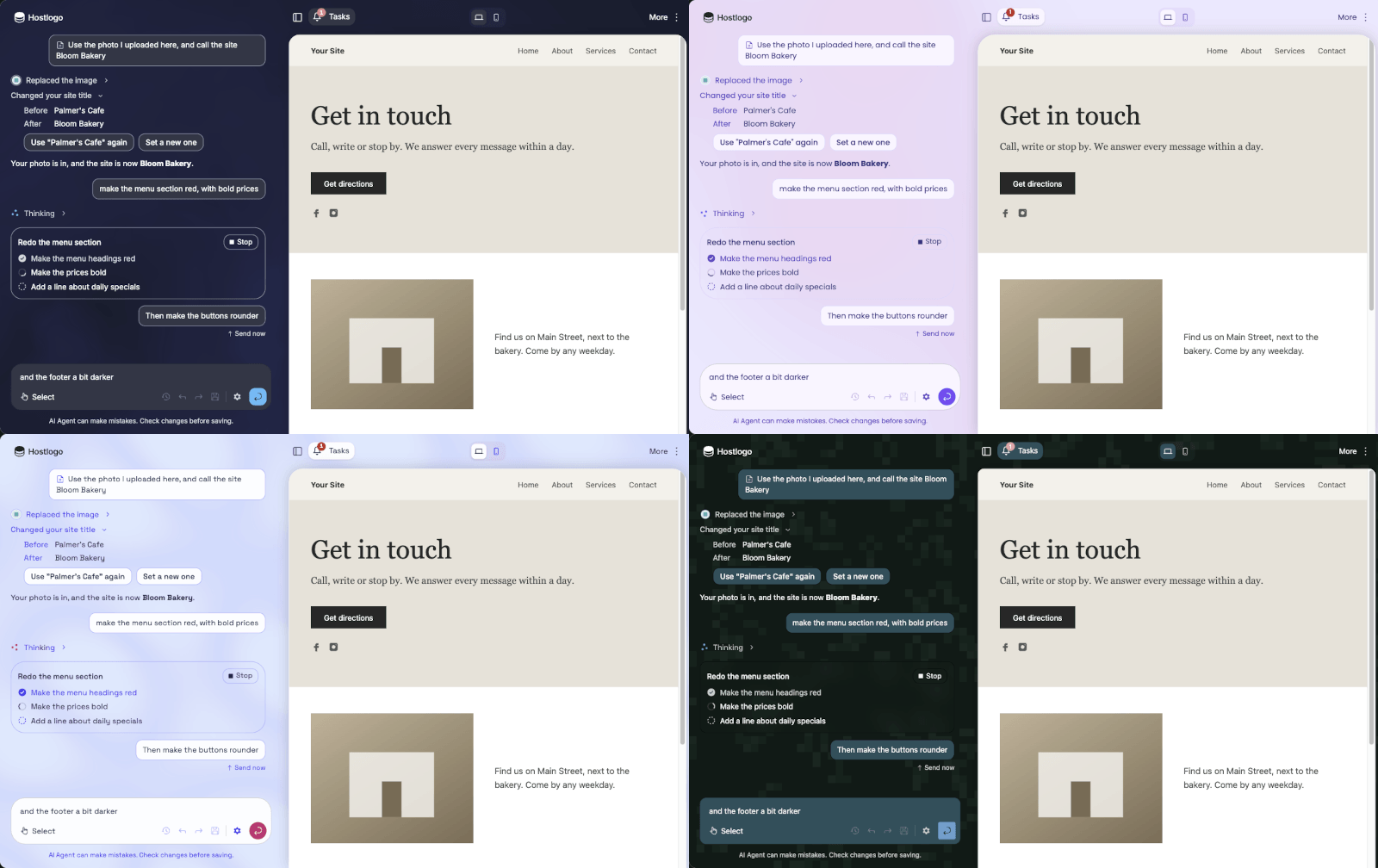
In Extendify v3.2 we introduced branding customization for Launch. Now the same personalization is available for the new AI Agent interface, so the entire experience follows your brand style. To access the branding customization tool, replace YOURLICENSE with your license code in the following URL: https://extendify.com/agent-designer/?partner=YOURLICENSE
MCP connector for WordPress
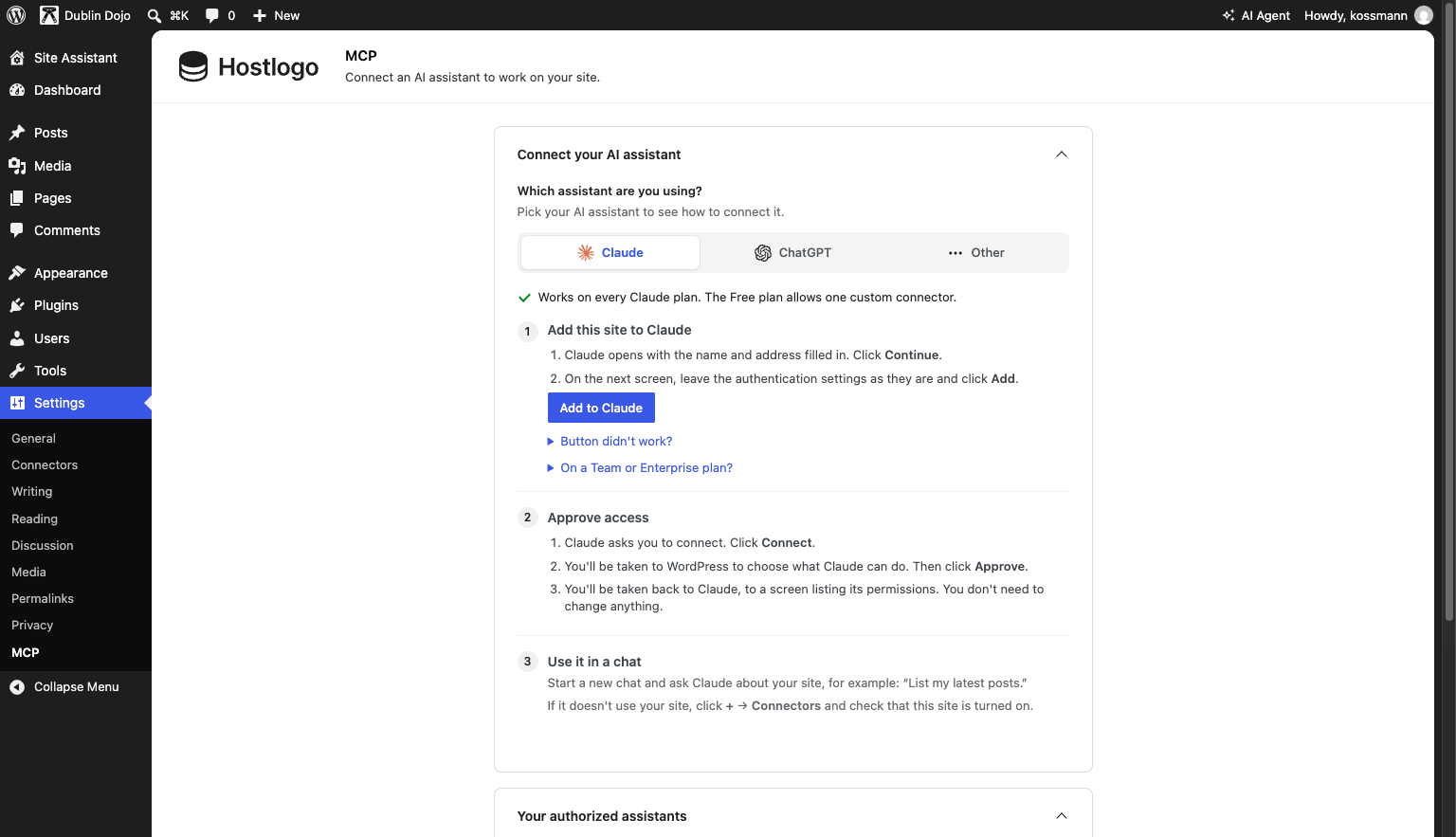
Users can now connect their website directly to the AI assistant of their choice, like Claude or ChatGPT, and manage it from there. In the WordPress Admin, the “Settings > MCP” page walks users step by step through connecting their website to their AI assistants. Once connected, they can easily choose between read-only and read-write access, and you can review a log of its recent actions.
The current capabilities are designed for administrative and maintenance tasks, and are especially powerful for users who manage multiple websites. They can ask questions like “do any of my websites need an update?” and follow up with “update all plugins”, or make bulk content changes, like updating outdated information across several websites. Users can also work with Product Platform plugins to manage their online store, forms, and much more.
Note: This feature is currently disabled for all partners, but if you would like to enable it for your customer base, just let us know.
Other Fixes and Improvements
This release comes with several other fixes and refinements, including:
- Added language support for Basque and improved language support for Brazilian Portuguese, Czech, Greek, Hungarian, Serbian, and Slovak.
- Launch: new optional partner setting that keeps new sites private until the user is ready to publish them.
- Added a URL Parameter to set a secondary site language (e.g.,
multilingual=fr_CA). - Improved the layout of WooCommerce pages.
This is our biggest AI Agent update yet, and we can’t wait to see how your users put it to work. Share your thoughts with us, so we can keep building in the right direction together.
Customer-facing release notes
Based on feedback from our partners, here’s a customer-facing version of this update that you can share with your users.
A smarter, faster AI Agent
Your AI Agent has been rebuilt from the ground up to make creating and updating your website easier than ever. Changes now appear on your page in real time, without reloading the AI Agent, and clearer status messages show you what’s happening at every step. The AI Agent can now plan and handle more complex, multi-step requests, and if you change your mind, the new version history lets you preview and restore any previous version of your site.
No need to explain where things are on your page. The AI Agent can find the right spot on its own, or ask you to point to the exact element. Just ask something like “add an FAQ question about our 15% student discount”.
The AI Agent also helps you avoid common design mistakes. If you ask to “change the background color to black” and your content becomes hard to read, it lets you know and suggests better colors.
You can also do much more with it, like changing your header and footer, creating blog posts, adding Google Maps, and managing supported plugins. And with the improved Quick Edit, you can make fast changes to your content right from your website, without ever needing to open the block editor.
Get your site ready to launch
A new guided setup helps you review the essentials, like your design, logo, and site title, so your website is ready to share in minutes. If you run an online store, it also walks you through setting up your currency, tax rates, and payment methods.
Discover everything the AI Agent can do
Browse a full list of what the AI Agent can do, filter it, and run any action with a single keystroke. The list adapts to the page you’re viewing and the plugins on your site, so you always see the most relevant options.
Know what to do next
The new Task Center brings together recommended next steps for your website, and when you come back to manage your site, a welcome screen suggests the most useful actions to take.
Manage your website from Claude, ChatGPT, and other AI assistants
You can now connect your website to your favorite AI assistant and manage it right from there. Go to “Settings > MCP” in your WordPress Admin and follow the step-by-step instructions. Once connected, you choose whether the assistant can only read your site or also make changes.
Here are a few things you can try:
- “What can you tell me about my website?”
- “Reply to the first comment on my website with ‘Thank you for leaving a comment!’”
- “Turn off auto-updates for all my website plugins.”
- “Check if there are any inactive themes on my website, and if so, delete them.”
- “Do any of my websites need an update?”
Other improvements
- Added support for Basque and improved support for Brazilian Portuguese, Czech, Greek, Hungarian, Serbian, and Slovak.
- Improved the layout of WooCommerce pages.